

Replay tool
Mission replay software for geo-referenced radiation mapping instruments
Highlights
-
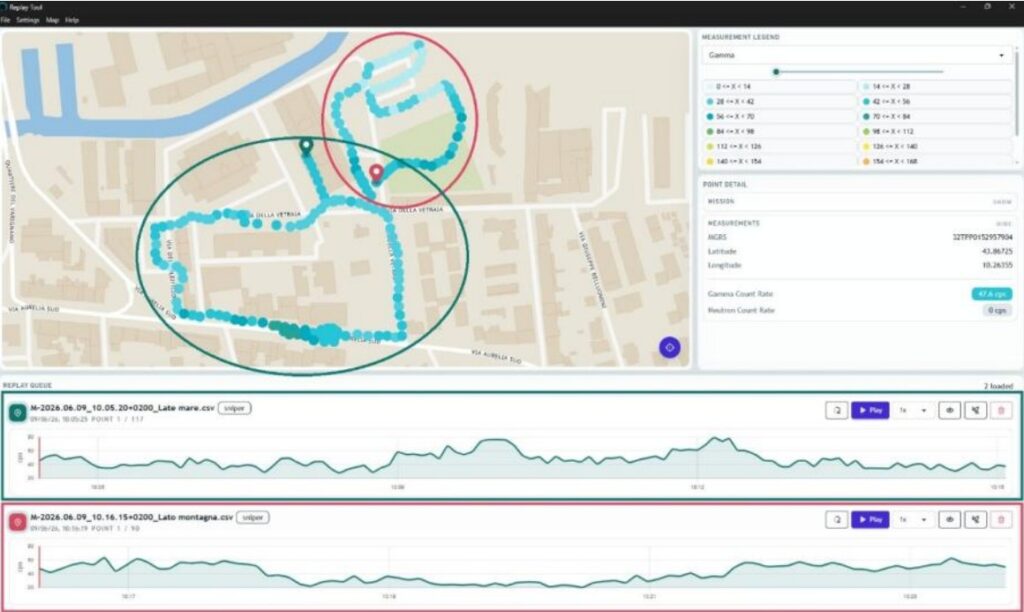
Simultaneous visualization of multiple missions on a single map
-
Dynamic replay of mission paths with adjustable speed (0.25x to 20x)
-
Color-coded mapping of gamma and neutron measurements
-
Detailed point analysis with coordinates, radiological data and spectra
-
Support for online (satellite) and offline maps (.MBTiles)
-
Compatible with GAMON Mobile, GAMON Pack, SNIPER-GN, Diver Explorer and Drone systems
-
Multi-mission comparison and visualization
Overview
Replay Tool is a mission replay software designed to review and consolidate radiological monitoring activities carried out with CAEN mobile mapping instruments within a single environment. It enables operators to analyse previously acquired missions through a dynamic and synchronized visualization of geo‑referenced data.
The application allows the simultaneous display of multiple missions on a common map, with color‑coded measurement points representing the recorded radiological data. The replay functionality reproduces the path followed by the instrument at selectable speeds, providing a clear understanding of the evolution of the measurements over time. Through an intuitive graphical interface, users can access detailed information for each acquisition point, including position, radiological values and energy spectra. The software supports both online and offline map visualization, enabling flexible operation in connected or disconnected environments. Replay Tool is fully compatible with several CAEN systems, including GAMON Mobile, GAMON Pack, SNIPER-GN, GAMON Diver Explorer and GAMON-Drone, allowing unified post‑processing and analysis across the entire portfolio of field instruments and easy data reachback.
Applications and Scenarios:
-
Post-mission analysis and validation of radiological surveys
-
Review and comparison of multiple missions performed with different instruments
-
Review of radiological data evolution vs time with repeated path analysis
-
Training and simulation of field operations using recorded datasets
-
Support to emergency response by reconstructing measurement timelines
-
Reporting and data interpretation for environmental and security monitoring activities
Request a Quote

Technical Specifications

|
System Requirements |
Operating System:
|
|
Input Data |
|
|
Replay Controls |
|
|
Compatibility |
|
|
Licensing |
USB hardware key required for software activation |
Footer